# /bin/bash: dynare++: command not found (MacOS)
**URL:** https://forum.dynare.org/t/bin-bash-dynare-command-not-found-macos/21501
**Category:** Dynare++
**Created:** [23 November 2022 15:47 UTC](https://forum.dynare.org/t/bin-bash-dynare-command-not-found-macos/21501 "2022-11-23T15:47:53Z")
**Posts on this page:** 15
**Page:** 1
### Author:  [@ru\_ben](https://forum.dynare.org/u/ru_ben)
#### Post date: [23 November 2022 15:47 UTC](https://forum.dynare.org/t/bin-bash-dynare-command-not-found-macos/21501/1 "2022-11-23T15:47:53Z")
Hi,
I’m having problems with Matlab. It works pretty well two weeks ago but now I have run again my code and it says that `/bin/bash: dynare++: command not found`. I have included all the paths as before (see the image). I also downloaded the latest version (5.3) to see what happens, but nothing works. Any help please? Thanks!

---
### Author:  [@jpfeifer](https://forum.dynare.org/u/jpfeifer)
#### Post date: [23 November 2022 15:53 UTC](https://forum.dynare.org/t/bin-bash-dynare-command-not-found-macos/21501/2 "2022-11-23T15:53:41Z")
But usually, you don’t call Dynare++ from Matlab. How exactly did you call Dynare++ from within Matlab?
---
### Author:  [@ru\_ben](https://forum.dynare.org/u/ru_ben)
#### Post date: [23 November 2022 15:57 UTC](https://forum.dynare.org/t/bin-bash-dynare-command-not-found-macos/21501/3 "2022-11-23T15:57:09Z")
Okay, so let me be more explicit. Sorry for that: I’m creating my .mod file within a script in Matlab (that works perfectly), but then I have to run `!dynare++ --per 15 --sim 3 --ss-tol 1e-10 RubenFernandez.mod`. With that I should get `RubenFernandez.mat`, but I don’t get it because` dynare++` is not found. That’s what I’ve been taught to do, if there are more efficient/correct ways I’m of course open! Thanks a lot for the fast response.
---
### Author:  [@jpfeifer](https://forum.dynare.org/u/jpfeifer)
#### Post date: [23 November 2022 16:00 UTC](https://forum.dynare.org/t/bin-bash-dynare-command-not-found-macos/21501/4 "2022-11-23T16:00:36Z")
That’s fine. I am not a Mac user. @wmutschl may be able to help.
---
### Author:  [@ru\_ben](https://forum.dynare.org/u/ru_ben)
#### Post date: [23 November 2022 16:02 UTC](https://forum.dynare.org/t/bin-bash-dynare-command-not-found-macos/21501/5 "2022-11-23T16:02:04Z")
Thanks a lot. I have edited the question to clarify that I’m a Mac user.
---
### Author:  [@jpfeifer](https://forum.dynare.org/u/jpfeifer)
#### Post date: [23 November 2022 16:08 UTC](https://forum.dynare.org/t/bin-bash-dynare-command-not-found-macos/21501/6 "2022-11-23T16:08:58Z")
But is Dynare++ also in your system path? You are calling something from the command line. I doubt that the Matlab path will be sufficient in this case.
---
### Author:  [@ru\_ben](https://forum.dynare.org/u/ru_ben)
#### Post date: [23 November 2022 16:34 UTC](https://forum.dynare.org/t/bin-bash-dynare-command-not-found-macos/21501/7 "2022-11-23T16:34:21Z")
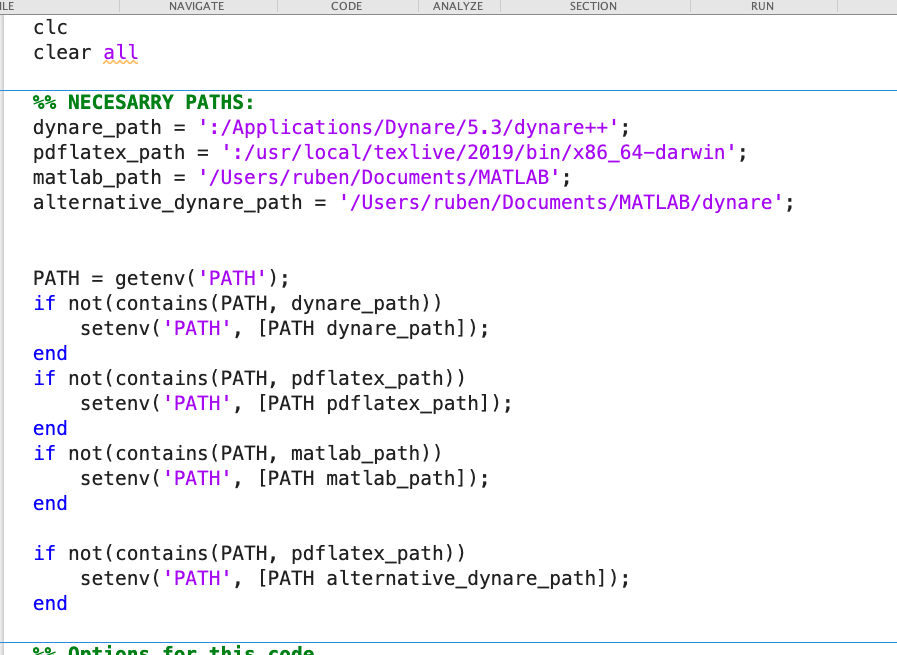
I’m also including these lines in the script. Is it what you mean?
---
### Author:  [@wmutschl](https://forum.dynare.org/u/wmutschl)
#### Post date: [23 November 2022 17:14 UTC](https://forum.dynare.org/t/bin-bash-dynare-command-not-found-macos/21501/8 "2022-11-23T17:14:23Z")
sorry, but I have no experience with dynare++.
To see whether it is really a problem with PATH, you could open MATLAB from Terminal.app:
```bash
/Applications/MATLAB_R2022b.app/bin/matlab
```
and then see whether this helps, see the comment here:
[optional-pass-the-full-path-to-matlab-to-run-system-commands](https://git.dynare.org/Dynare/dynare#optional-pass-the-full-path-to-matlab-to-run-system-commands)
otherwise, I don’t know, did you update something on your machine?
---
### Author:  [@ru\_ben](https://forum.dynare.org/u/ru_ben)
#### Post date: [23 November 2022 18:18 UTC](https://forum.dynare.org/t/bin-bash-dynare-command-not-found-macos/21501/9 "2022-11-23T18:18:33Z")
Hi,
What should I do in `/Applications/MATLAB_R2022b.app/bin/matlab`? I’ve done what’s written in the link you sent but it doesn’t seem to work D:
---
### Author:  [@ru\_ben](https://forum.dynare.org/u/ru_ben)
#### Post date: [23 November 2022 18:30 UTC](https://forum.dynare.org/t/bin-bash-dynare-command-not-found-macos/21501/11 "2022-11-23T18:30:16Z")
Deleted because I solved that particular issue. The original problem still exists. Sorry.
---
### Author:  [@ru\_ben](https://forum.dynare.org/u/ru_ben)
#### Post date: [23 November 2022 18:33 UTC](https://forum.dynare.org/t/bin-bash-dynare-command-not-found-macos/21501/12 "2022-11-23T18:33:10Z")
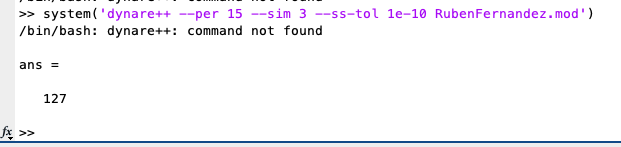
I think this may useful: I get 127 after compiling this.
---
### Author:  [@ru\_ben](https://forum.dynare.org/u/ru_ben)
#### Post date: [23 November 2022 18:49 UTC](https://forum.dynare.org/t/bin-bash-dynare-command-not-found-macos/21501/13 "2022-11-23T18:49:50Z")
Well, I’ve partially solved this: I’ve created a folder `dpp/` inside my directory. Then I copied the `dynare++` executable in that folder. Then I run `!dpp/dynare++ --per 15 --sim 3 --ss-tol 1e-10 RubenFernandez.mod` instead of `!dynare++ --per 15 --sim 3 --ss-tol 1e-10 RubenFernandez.mod`. Now it works. But I don’t like the idea of having to create that `dpp/` folder in each directory… Do you have any idea to solve this?
---
### Author:  [@jpfeifer](https://forum.dynare.org/u/jpfeifer)
#### Post date: [23 November 2022 19:28 UTC](https://forum.dynare.org/t/bin-bash-dynare-command-not-found-macos/21501/14 "2022-11-23T19:28:48Z")
But that clearly shows that `dynare++` is not in your system path. Matlab may be able to locate it due to a Matlab path being set. But that does not mean that `bash` will be able to locate it. That’s why I added @wmutschl because I thought he knows how to tell `bash` where a file is located.
---
### Author:  [@ru\_ben](https://forum.dynare.org/u/ru_ben)
#### Post date: [23 November 2022 22:50 UTC](https://forum.dynare.org/t/bin-bash-dynare-command-not-found-macos/21501/15 "2022-11-23T22:50:48Z")
I agree, indeed. But I’m not being able to solve it…
---
### Author:  [@jpfeifer](https://forum.dynare.org/u/jpfeifer)
#### Post date: [24 November 2022 09:11 UTC](https://forum.dynare.org/t/bin-bash-dynare-command-not-found-macos/21501/16 "2022-11-24T09:11:49Z")
Did you try anything from [macos - Setting PATH environment variable in OSX permanently - Stack Overflow](https://stackoverflow.com/questions/22465332/setting-path-environment-variable-in-osx-permanently)?